Sheet-Driven Connect & Message Automation
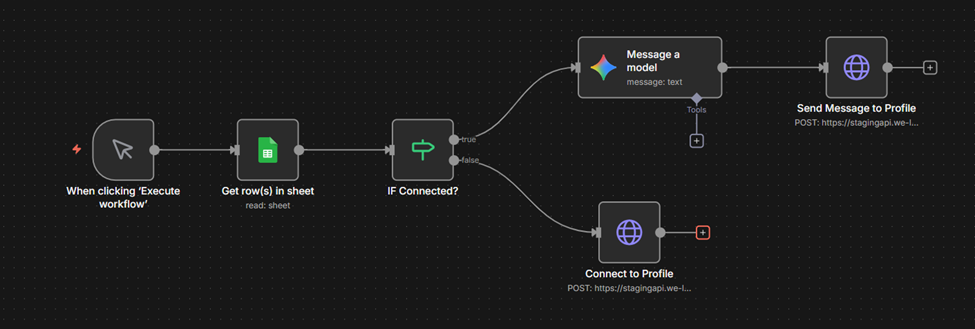
This workflow reads profile data from a Google Sheet and automatically decides whether to send a message or send a connection request based on each profile’s connection status.
It allows you to manually trigger outreach sequences directly from sheet data.
Flow Steps Explained
Authentication Setup (Custom API Key + API Secret)
In your n8n workspace:
- Go to Overview → Credentials → New
- Choose Custom Auth
- Add your authentication details like:
{
"headers": {
"x-api-key": "546………………….41a",
"x-api-secret": "WQi……………………….pM=",
"Content-Type": "application/json"
}
}
Global Variables in n8n
n8n allows you to store common values as global variables so they can be reused across all workflows.
Steps to create variables:
● Go to n8n Dashboard → Overview → Variables
● Click Add Variable
● Set:
Key → Name of the variable (example:accountId)
Value → Actual value
● Save the variable
● Use it in workflows like this:
{{ $vars.accountId }}
This credential will be used in all HTTP Request nodes calling WeLink APIs.
1. Manual Trigger (“When clicking Execute workflow”)
Node Type: Manual Trigger
Purpose:
Starts the workflow manually whenever you click Execute Workflow in n8n.
This lets you process Google Sheet data on demand.
2. Get Row(s) in Sheet
Node Type: Google Sheets –Get rows
Purpose:
Fetches all rows from your LinkedIn profile sheet.
Each row includes fields like:
● profile_id
● first_name
● headline
● is_connected
● etc.
Output:
An array of rows that the workflow will process.
3. IF Connected?
Node Type: IF Condition
Purpose:
Check whether the profile is already connected to your LinkedIn account.
Condition Example:
{{ $('Get row(s) in sheet').item.json['is_connected'] }}
Branch Behavior:
● TRUE → Already Connected
Go directly to generating a personalized message using AI.
● FALSE → Not Connected
Go to the “Connect to Profile” API call.
4. Message a Model (AI Message Generator)
Node Type: OpenAI / LLM
Purpose:
Creates a personalized LinkedIn message using:
● First name
● Headline
● Other profile sheet data
Used only when the profile is already connected.
The generated text is passed to the next node.
5. Send Message to Profile
Node Type: HTTP Request
API: /api/v1/send_message
Purpose:
Sends the AI-generated message to the LinkedIn profile via WeLink.
Triggered only if connected.
6. Connect to Profile
Node Type: HTTP Request
API: /api/v1/connect
Purpose:
Sends a connection request to profiles that are not yet connected.
Triggered from the false branch of “IF Connected?”.
Purpose of This Flow
● Semi-manual outreach automation
● Uses sheet data as the source of truth
● Automatically chooses between:
○ Send Message (if connected)
○ Send Connection Request (if not connected)
This makes it ideal for controlled outreach campaigns.