WeLink Regular Search → Save → View → Follow Automation
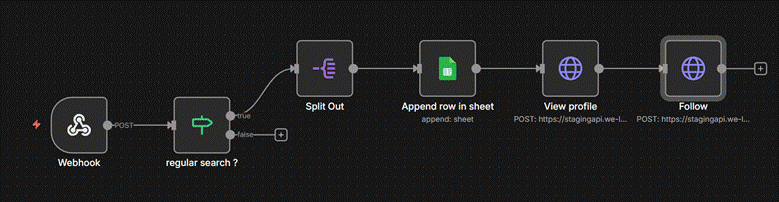
This automation flow listens for WeLink’s regular search webhook event, extracts all LinkedIn profile results from the API response, stores them in Google Sheets, and then automatically performs two actions for each profile:
- View Profile
- Follow Profile
The flow processes each profile result individually and runs fully automatically whenever the webhook event is triggered.
Flow Diagram
Webhook → IF regular search? → Split Profiles → Append to Sheet → View Profile → Follow Profile
Get started
Authentication Setup (Custom API Key + API Secret)
In our n8n workspace:
- Go to Overview → Credentials → New
- Choose Custom Auth
- Add your authentication details like:
{
"headers": {
"x-api-key": "546………………….41a",
"x-api-secret": "WQi……………………….pM=",
"Content-Type": "application/json"
}
}
Global Variables in n8n
n8n allows you to store common values as global variables so they can be reused across all workflows.
Steps to create variables:
● Go to n8n Dashboard → Overview → Variables
● Click Add Variable
● Set:
○ Key → Name of the variable (example:accountId)
○ Value → Actual value
● Save the variable
● Use it in workflows like this:
○ {{ $vars.accountId }}
This credential will be used in all HTTP Request nodes calling WeLink APIs.
1. Webhook Trigger
Node Type: Webhook
Purpose:
Receives incoming webhook events from the WeLink backend. When WeLink performs a regular search operation, it sends a webhook payload containing a list of LinkedIn profiles.
Output:
Full JSON payload including:
● event type
● requestId
● status
● profiles list under body.result.profiles[]
2. IF Condition — “regular search?”
Node Type: IF (Condition)
Purpose:
Verifies if the incoming webhook belongs to the correct event type.
Condition Logic:
{{ $json["body"]["event"] === "/api/v1/regular_search" && $json["body"]["status"] === "SUCCESS" }}
● TRUE Path: Continue the workflow.
● FALSE Path: Stop the execution (ignore unrelated webhook events).
This ensures that the flow only processes regular search results.
3. Split Out
Node Type: Split Out / Item Lists
Purpose:
The webhook contains multiple profiles in an array at:
body.result.profiles[]
This node splits the array into individual workflow items, so each profile is processed separately.
Result:
One execution item per profile with fields like:
● first_name
● last_name
● public_identifier
● profile_id
● title
● company
● image
4. Append Row in Sheet
Node Type: Google Sheets – Append Row
Purpose:
Stores each LinkedIn profile into a Google Sheet for tracking, analysis, or future automation flows.
Mapped Fields:
● First Name
● Last Name
● Profile ID
● Public Identifier
● Headline / Title
● Company
● Image
● Premium Status
This step turns your Google Sheet into a database of discovered LinkedIn profiles.
5. View Profile
Node Type: HTTP Request (POST)
API: /api/v1/view_profile
Purpose:
Automatically triggers a “profile view” action on the LinkedIn profile using WeLink’s backend.
Input:
accountIdprofile_url ( construct the profile url using public identifier )
This simulates a natural profile view before performing follow or messaging actions.
6. Follow Profile
Node Type: HTTP Request (POST)
API: /api/v1/follow
Purpose:
Sends a follow request to the LinkedIn profile after viewing.
Input:
Same profile_id ( {{ $('Append row in sheet').item.json['profile_id'] }} ).
Output:
A follow action for each LinkedIn profile found in the search results.
Purpose and Benefits
Fully automated lead discovery workflow
Every time WeLink performs a regular search, this flow captures all profiles and processes them without manual steps.
Centralized storage in Google Sheets
Makes it easy to monitor:
● profile data
● duplicates
● conversion
● follow-up actions
Automated LinkedIn actions
Systematically:
● Views profile
● Follows profile
This increases profile visibility and engagement opportunity.